
Your questions answered
Hopefully you’ll find the answers you’re looking for in the list below.
If not, please get in touch with us.
About our products
Are your computers just regular PCs?
How reliable is your stuff?
Do you sell Mini ITX or Micro ATX?
Do you sell any PC/104 gear?
Do you sell any 900MHz gear?
Do you sell any other Soekris gear?
Do you sell any Mikrotik stuff?
Can’t I get the same thing for less by buying direct from overseas?
Can I get a discount for buying in bulk?
Can you sell me a board without the case?
What is C-Tick compliance?
What’s the difference between an unregulated and a regulated power supply?
Can I use the CM9 miniPCI wireless card in my laptop?
fit-PC2 desktops
How do I install software onto my fit-PC2?
Can I put Windows XP Pro onto my fit-PC2?
Can I install XXXX operating system onto my fit-PC2?
Can I install a larger hard drive in my fit-PC2?
Where can I find the latest drivers for the fit-PC2?
What’s wrong with my display on my Windows 7 / Windows XP fit-PC2?
ALIX / net servers
What size Compact Flash card should I use with the OpenBSD / Voyage / m0n0wall / pfSense®
/ Rident™
image?
How do I access the image on my CF card?
Why do I get garbage when I connect to the serial console?
What’s the root password for the OpenBSD / Voyage / m0n0wall / pfSense®
/ Rident™
image?
Can I reflash my Compact Flash card remotely?
About our website
Why doesn’t the shopping cart work?
I really like your website. Who built it?
How to say…
How do you say ‘Yawarra’?
How do you say ‘Soekris’?
How do you say ‘ALIX’?
Other questions
Why isn’t my question answered here?
Answers
About our products
Are your computers just regular PCs?
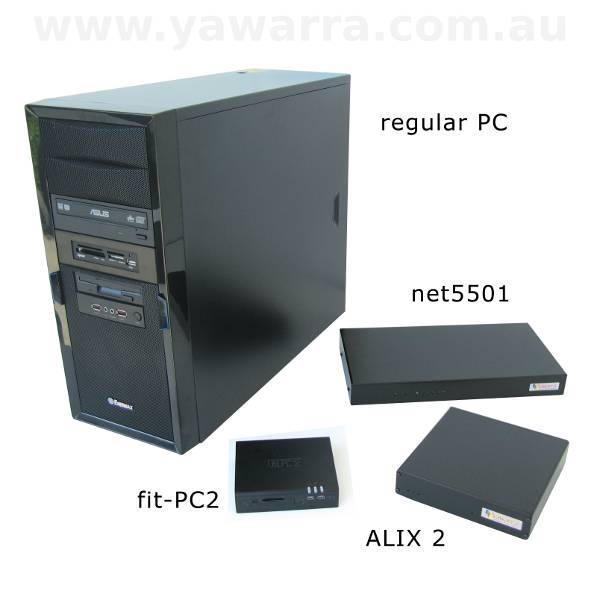
Our fit-PC3s, fit-PC4s and Intense PCs are energy-efficient desktop PCs, designed to run Windows or Linux, and we sell these with monitors, keyboards, mice and speakers. And they’re perfect for all office, retail or classroom applications.
However, our ALIX, APU and net servers are not regular PCs. Although they are PC compatible, they generally don’t have anywhere to plug in a screen or a keyboard, and they’re not designed to run Windows. So you wouldn’t normally use them to write documents or browse the Internet.
On the other hand, if you (or someone) want to build a firewall, a router, a wireless access point or a server, then the rest of our hardware is perfect for the job.
And although a cheap router or wireless access point may cost less, our hardware is incredibly more flexible and powerful because it can run Unix or Linux or BSD, etc which means that you (or someone) can program it to do almost anything.
And it’s less expensive, more attractive and heaps smaller, quieter and more reliable than a regular beige-box PC.
To learn more, read all about our tiny computers.
How reliable is your stuff?
Put it this way, we’re so impressed with how well our stuff lasts, that we doubled the standard 1-year warranty a few years ago, and we also offer up to a 5-year extended warranty on most of our computers.
We’ve had customers tell us about our little boxes that just keep going and going, in quite extreme conditions sometimes.
And although we don’t have specific numbers for you, like mean-time between failures (MTBF) data, we can say that our return rate is less than 1%.
Our hardware is just designed to last!
Do you sell Mini ITX or Micro ATX?
We don’t sell any Micro ATX form factor boards, but we do have one Mini ITX single board computer (SBC), the ALIX 1.
The rest of our SBCs are even smaller than Mini ITX, have no moving parts, are extremely reliable and create minimal noise and heat.
Worth a look? Check out our range in our online shop.
Do you sell any PC/104 gear?
No, the computers we sell are not PC/104 form factor.
Although our single board computers are not stackable, most come with the option of adding expansion cards via miniPCI and/or PCI, and can support compact flash and/or 2.5″ hard drives. Multiport LAN cards are also available.
Our boards are all small and very robust making them suitable for use in an industrial environment.
Worth a look? Check out our range in our online shop.
Do you sell any 900MHz gear?
No, we don’t.
In Australia, 900MHz equipment must:
- operate in the frequency range 916 to 928MHz (inclusive), and
- not be able to operate outside this allowed frequency range
Unfortunately much of the 900MHz equipment that is available overseas – including the Ubiquiti SR9 – operates in the frequency range 900 to 928MHz, which means that we are not legally able to sell it.
Do you sell any other Soekris gear?
We currently offer the net5501 and the net6501 in our custom cases, the and the LAN 1741 and LAN8141 4-port ethernet cards from Soekris Engineering.
We’re happy to quote on price and availability on anything else from their range. Minimum order quantities and lead times will apply. Please contact us to find out more.
net4501, net4526 & net4826
We don’t currently stock the net4501, net4526 or net4826 boards.
However, if you’re looking for 1 ethernet port and 2 miniPCI slots, you might find that the ALIX 3 board from PC Engines is a good alternative.
With a faster processor and more memory than the net4526, plus a Compact Flash slot and a lower price tag, the ALIX 3 might just be worth a look!
Do you sell any Mikrotik stuff?
We don’t sell any routerboards, RouterOS licences or other Mikrotik products.
You might be interested in our range of ALIX and net servers for building wireless networks.
If you have your heart set on Mikrotik products, please visit the Mikrotik website for a current list of their Australian distributors.
Can’t I get the same thing for less by buying direct from overseas?
The short answer? Possibly, yes.
However, there are a number of issues associated with buying direct from overseas that you might want to consider first.
1. Exchange rates
The price you see on overseas websites may look cheaper because they are often in a different, stronger currency.
The exchange rates also fluctuate daily but we want to offer price stability, so we choose a rate and base our prices on it.
Long term, if the exchange rate goes up or down significantly, our prices will change to reflect this.
2. Export restrictions
Thanks to increased international security, some countries may refuse to ship goods to you internationally, especially electronic goods.
3. Shipping
Australia is truly the “a$$ end of the world”, which means it is expensive to ship things to and from here, especially for one or two items. It also can take a lot longer for your goods to arrive.
4. Importing costs
Firstly, there’s GST, payable if the value of your goods exceeds $1000. Of course, if you’re in business, you get to claim the GST back.
Secondly, there are costs associated with clearance through customs, from $50 to more than $200 depending on who clears it for you, once again applicable for shipments over $1000 in value.
5. Local regulations
Australian regulations are often more strict than they are overseas, which may mean that you can’t use your items successfully in Australia.
In addition, if you supply the items to someone else and they don’t comply with the regulations, you may be breaking the law, so be careful with this.
6. Warranties and returns
Things do go wrong sometimes, and it can be more difficult to resolve warranty issues with an overseas supplier, and expensive to ship goods back to them.
So why buy from us?
We believe that we offer value in a number of ways that more than matches any advantage of buying direct from overseas, including:
- No headaches dealing with Customs and freight companies
- No hidden charges
- Known, fixed costs
- Guaranteed compliance with Australian regulations
- Local no-nonsense warranty service
- Cheaper shipping costs
- Super fast delivery, including a 24-hour turnaround on many orders because we hold stock in our own warehouse
- An easy to use website, packed with useful information and resources
- A straightforward shopping and checkout process, with no requirement to register
- A wide range of secure payment options, including credit card (with no surcharges), direct deposit and cheque
- An exclusive range of custom designed cases and accessories
- An awesome customer experience, free with every purchase, including great communication with real people by phone and email
If you don’t see the value in what we offer, then you’ll probably be happier buying direct from overseas.
Otherwise, please give us a go.
Can I get a discount for buying in bulk?
Yes, you can.
Our quantity pricing starts at 5, and we’re also happy to discuss your particular needs for ongoing high volume purchases.
Please contact us for more information or a quote.
We also offer reseller and OEM pricing, so if you’d like to offer our products to your customers, or use our products in yours, please let us know and we’ll tell you all about our discount program.
Can you sell me a board without the case?
Yes, we can. Please see our range of boards in our online shop.
Please note that if you buy a board without a case, it will need to be housed in a suitable metal enclosure, in order to comply with Australian Communications and Media Authority (ACMA) emissions regulations.
What is C-Tick compliance?
Anyone who imports equipment into Australia is considered to be the manufacturer by the ACMA and is therefore responsible for ensuring that the equipment complies with the relevant Australian standards for electromagnetic interference (EMI).
We are registered with the ACMA as an importer/manufacturer of equipment and all our ALIX, net, fit-PC2 and miniPCI products come with the required C-Tick labelling to indicate compliance with Australian regulations.
Our ACMA supplier code, as listed beside the C-Tick logo on our products, is N14401.
We also complete the required ‘Declaration of Conformity’ paperwork for each product.
It is illegal for us to sell equipment that does not bear a C-Tick label, and it is also illegal for us to C-Tick label equipment that has not been tested against the applicable standards.
All of our hardware also complies with FCC (USA) and European regulations.
What’s the difference between an unregulated and a regulated power supply?
Basically, the output voltage of a regulated power supply stays very close to its nominated level (e.g. 12V) over a wide range of current loads.
In other words, no matter what you plug into it, provided you don’t overload it, it will deliver the specified voltage.
In contrast, the output voltage of an unregulated power supply can vary widely, depending on the current load.
In particular, for low current loads, it may output a voltage that is significantly higher than its nominal value, which can be bad for sensitive electronic equipment.
Most of our SBC motherboards can cope with a range of voltages, typically around 10-18V, so using an unregulated power supply should not generally be a problem (please check the specifications for your particular board).
Because the circuitry of regulated power supplies is more complex, they tend to be more expensive than unregulated power supplies, although they are often lighter and smaller.
Regulated power supplies also tend to output better quality (smoother) DC than unregulated power supplies.
In the case of our power supplies, our 12V 1.5A, 12V 2.5A and 18V 1A regulated power supplies can fit side-by-side in a powerboard, unlike they typically bulky unregulated power supply, which can be important when space is at a premium.
Our regulated power supplies also happen to output 18W (or more), so they are a better option when more power is required, such as with Power over Ethernet (PoE).
Can I use the CM9 miniPCI wireless card in my laptop?
The CM9 is a miniPCI type 3B wireless card and should fit into any laptop with a miniPCI slot. Please check with your laptop’s manufacturer for compatibility with your particular laptop and to obtain the necessary drivers.
You might also find this list of laptops that should be compatible with the CM9 useful.
fit-PC2 desktops
How do I install software onto my fit-PC2?
You have a few options for installing new software onto your fit-PC2 or fit-PC2i.
You can get yourself an external USB DVD drive, or you can you can put your install files onto a USB thumb drive, or install over the network, from another computer.
Can I put Windows XP Pro onto my fit-PC2?
Yes.
We can’t sell you an XP Pro licence, due to licensing restrictions from Microsoft.
But if you have a spare XP Pro licence lying around, you’re more than welcome to install it, and it should work just fine.
Can I install XXXX operating system onto my fit-PC2?
The short answer is, we don’t know.
The fit-PC2 is currently available with Windows XP, Windows 7 and Ubuntu Linux 9.10.
Probably the simplest way to find out is to give it a go.
We can’t give you any guarantees, but it’s worth a try.
You could also post a question on the fit-PC2 users forum, or try the fit-PC2 wiki.
Can I install a larger hard drive in my fit-PC2?
2.5″ hard drives come in two thicknesses – 9.5mm and 12mm – and the fit-PC2 only has space for a 9.5mm drive.
We currently offer the fit-PC2 with a 500GB 2.5″ 9.5mm SATA hard drive.
You can source larger hard drives elsewhere, but you will need to make sure that you get a 9.5mm drive.
The largest available 9.5mm drives are currently around the 1TB mark.
Note: The Windows 7 units include a recovery disk that allows you to reinstall onto a larger hard drive.
Where can I find the latest drivers for the fit-PC2?
The latest available drivers for the fit-PC2 are available on the ‘Download’ page on the fit-PC2 wiki.
What’s wrong with my display on my Windows 7 / Windows XP fit-PC2?
If you’re having trouble with the display on your Windows fit-PC2, there are a couple of things to try.
Firstly, make sure you have the latest video drivers for Windows on your fit-PC2.
If you’re using a VGA adapter on a Windows XP unit, you’ll need to use the IEGD display driver, not the GMA500 driver that comes with it by default.
You might also want to check that your unit is not in ‘multi-monitor’ mode. This can prevent you from accessing the stated maximum resolution of 1920 x 1080. This can be changed via the display settings in Windows 7.
ALIX / net servers
What size Compact Flash card should I use with the Voyage / m0n0wall / pfSense® / Rident™ image?
Well, that depends on which operating system image you’re using, and whether you’re downloading it from our OS images page, or getting it pre-installed by us.
| Operating system | Downloaded image | Pre-installed image |
|---|---|---|
| pfSense® or Rident™ | Doesn’t allow you to write to the CF card, so choose the smallest card that will fit the image size e.g. 4GB | |
| m0n0wall | Doesn’t allow you to write to the CF card, so choose the smallest card that will fit the image size e.g. 4GB (or 256MB if you have one) | |
| Voyage Linux | Has been created on a specific size CF card, so choose a CF card to match e.g. 2GB Note: There will be space left on the CF card for writing files |
Can be installed on any CF card that is at least as big as the image size e.g. 2GB or larger Note: There will be space left on the CF card for writing files |
You can find more information on image sizes on our operating system images page.
How do I access the image on my CF card?
You can access the image on your CF card in a number of different ways, for configuration and/or file transfer:
- Via the web interface in m0n0wall, pfSense® and Rident™
- By connecting to the console with a null modem cable
- Using a CF card reader
To access the image on your CF card via the console you’ll need a null modem cable and a terminal emulator program such as CU or tip in Unix, or Hyperterminal or Tera Term (Pro) in Windows.
Steps
1. Connect a null modem cable to the console port on your box and the other end to a serial port on the computer running your terminal emulator software.
2. Start your terminal emulator software.
The various settings you’ll need can be found in the readme.txt file under the appropriate image on our operating system images page.
Get an in-depth description of how to connect to the serial console in our terminal emulator tutorial.
Windows
In your terminal software, select the appropriate com port (i.e. Com 1, 2, 3, or 4) and set your connection speed, data bits, stop bits and parity.Click connect/start/go in your software.
Unix
The terminal software is generally run from the command line, with all of the settings provided as switches. For example, typing
cu -l /dev/ttys0 -s 9600
in OpenBSD, will use cu to connect you on ttys0 (first serial port) at a speed of 9600 baud.
3. Apply power to your box.
You should see readable text appear on the screen of your terminal emulator software.
If you see garbage, your settings may be wrong.
If you see nothing, check your settings, the power supply or your cable.
4. Start playing!
Why do I get garbage when I connect to the serial console?
The short answer is, your terminal settings need to be changed.
Now for the long answer.
The factory default terminal speed is 38400 baud for the ALIX board, 19200 baud for the net5501 and net6501 boards and 115200 baud for the APU boards.
In addition, each operating system image has a particular terminal speed built into the kernel. In the case of OpenBSD, Voyage Linux and monowall, the default terminal speeds should match the factory default settings for the ALIX and net boards. However, some operating system images, including the pfSense® system, have a default terminal speed of 9600 baud.
If the terminal speeds of your terminal emulator, your board or your operating system image don’t match, then you’ll see garbage on the console when you power up.
What you need to do to fix it, depends on where you see the garbage.
A. If you get garbage immediately on power-up, you’ll need to do the following:
- Set your terminal emulator speed to match the factory default setting for the board
If you’re using hyperterminal, you actually need to close the connection to change terminal speeds, even if it tells you otherwise (learned that one the hard way).
If you still get garbage, it’s possible that someone has already changed the terminal speed on the board, so you’ll have to figure out the correct terminal speed by trial and error.
Unfortunately with the ALIX, net5501 and net6501, pretty much any standard speed is possible. Happy hunting!
B. If you get garbage after the BIOS self-test, then your emulator is set to the correct board terminal speed but not to the same as the operating system kernel.
To fix this:
- Change the board terminal speed in the BIOS to match the operating system terminal speed
- Set your terminal emulator speed to match the operating system terminal speed
- Reboot the machine
C. Garbage at other times might be caused by inconsistent terminal settings within your operating system image, which generally doesn’t occur in practice, or by other problems with your software.
D. If you get nothing at all when you connect to the console, it’s worth checking that your null modem cable is working properly, by plugging it into something else that has a console, such as another ALIX or net board, a router, or a PC on which you’ve configured a console.
E. If you get garbage on our website, well then it’s just your lucky day!
999V75!/n/kZi^[)ZScSNJcjb{v;=Jz_v}n@@bCJ9%5jjVj1e7R-^e-oBfV-^Z-sCRVjr5CR r!
What’s the root password for the OpenBSD / Voyage / m0n0wall / pfSense® / Rident™ image?
Well, that depends on which image you’re using.
However, we’re not cruel enough to make you guess.
Instead, you can find the root password and more in the readme.txt file under the appropriate image on our operating system images page.
Can I reflash my Compact Flash card remotely?
Well, the good news it can be done! One of the better ways of doing it is to configure the CF card to be dual bootable with a bootloader like GRUB.
The bad news is that in order to do it, you have to set the box up this way to begin with.
If you already have a remote machine you need to reflash and you haven’t prepared it this way, then this won’t help you.
However, if you are planning a remote deployment then this setup is just the sort of thing you will need.
One of our helpful customers was good enough to describe a way of doing this with Linux, and has posted his notes to the Voyage Linux wiki.
You can find his description here:
wiki.voyage.hk/dokuwiki/doku.php?id=how_do_i_install_voyage_so_it_can_be_upgraded_remotely
The nitty gritty of configuring a WRAP or ALIX for dual booting (with Voyage Linux in this example) can be found here:
wiki.voyage.hk/dokuwiki/doku.php?id=dual_boot_wrap
but as pointed out in the article, this technique should work for any system that can be loaded from GRUB.
About our website
Why doesn’t the shopping cart work?
In order to use our online shop, you will need to have JavaScript and cookies enabled.
If one or both of these is not working in your browser, our website will not work properly.
You can contact us by email, phone or fax for more information or to place your order.
If you’re having intermittent troubles with our shopping cart, you might be able to fix the problem by clearing your browser cache or deleting the cookies set by www.yawarra.com.au.
Please note that deleting our cookies will empty your cart and clear all of your product selections and personal details.
Also, if you use a less common browser or browser version to view our website, you may have trouble with our website simply because we haven’t tested it in those browsers.
For a list of the browsers our website supports, please visit our website information page.
I really like your website. Who built it?
Thank you. We develop our website in-house.
Our aim is to make it easy to use and full of useful information.
How to say…
How do you say ‘Yawarra’?
We say it ‘Yah’ (as in yuck), ‘worr’ (as in warrant), ‘ah’ (as in hah), with the emphasis on ‘worr’.
Clear as mud?
Well we can’t even agree on how it’s said, but you can listen to our attempts at it, if you really have absolutely nothing better to do:
Wasn’t that fun?
How do you say ‘Soekris’?
Who knows how it’s supposed to be said, but we say it sew-chris.
How do you say ‘ALIX’?
We say it like ‘Alex’ (al-icks).
Anything else we can help you with?
Why isn’t my question answered here?
The only way we can create a useful list of FAQs is for you to ask us questions, frequently.
In the meantime, send us your question and we’ll respond to you personally.